RE+ 2026 · Nov 16–19 · Las Vegas

See what replacing your entire software stack looks like — Booth W15826.

Book a booth demo
Single Line Diagrams

Your string layout, drawn to code.

One click reads the inverters, strings, and batteries you actually designed and draws the diagram: symbols, labelled wires, conductor schedules, code notes, title block. Then it hands you the pen.

powerlily.com / sld
Auto-generated single line diagram in the Powerlily SLD editor
Ready to generate: the SLD already knows the panels and battery from your design
Auto-Generation

Generated from the design. Not a questionnaire.

Powerlily walks the electrical design you already built: every inverter, every MPPT, every string or branch circuit, batteries included. Real module counts and real electrical values land on the page, laid out the way an inspector reads it.

  • String inverters with per-MPPT strings, or microinverter branch circuits
  • Wire labels carry conductor spec plus temperature-corrected voltage and current per string
  • Batteries and hybrid inverters drawn in, with backfed breakers on the panelboard
  • Detached buildings handled: per-structure AC disconnects and feeders
  • Zones flow the way inspectors read: array, DC protection, equipment, service, utility
  • Parallel wires route in separate lanes, nothing overlaps
  • Restring the array later and the diagram warns you it's stale, regenerate in one click
Code Intelligence

It knows the code. Both of them.

Type the project address and Powerlily picks the rulebook: NEC for US ZIP codes, CEC for Canadian postal codes. Every number downstream follows.

Sized from real code tables

Conductors, equipment grounds, and overcurrent protection sized from the actual NEC and CEC tables, with the code reference printed beside the number.

Your site's design temperatures

Cold and hot design temps pulled from your location's weather extremes drive temperature-corrected string voltages. Override them whenever you like.

Voltage drop from physics

Run lengths and conductor sizes feed a real voltage-drop calculation, copper or aluminum, so long runs get flagged before the inspector finds them.

Code notes on the page

Numbered, jurisdiction-specific notes print directly on the diagram, so the AHJ sees the compliance story without asking.

Live 120% busbar rule warning with one-click fixes in the SLD configuration
Interconnection

The 120% rule, checked while you configure.

Solar plus storage trips the busbar rule more often than anyone admits. Powerlily checks it live as you set service size, main breaker, and interconnection type, and when it fails you get the three real fixes instead of an error message.

  • Live busbar check against your PV and battery backfeed
  • Fix one: supply-side tap, drawn correctly on the diagram
  • Fix two: main breaker derate, with the largest passing breaker computed for you
  • Fix three: a Power Control System from Enphase, Tesla, SolarEdge, Generac, FranklinWH, SPAN, Schneider, or Sol-Ark
  • Load-side, supply-side tap, and meter collar interconnections
  • Rapid shutdown devices from the brands you actually install
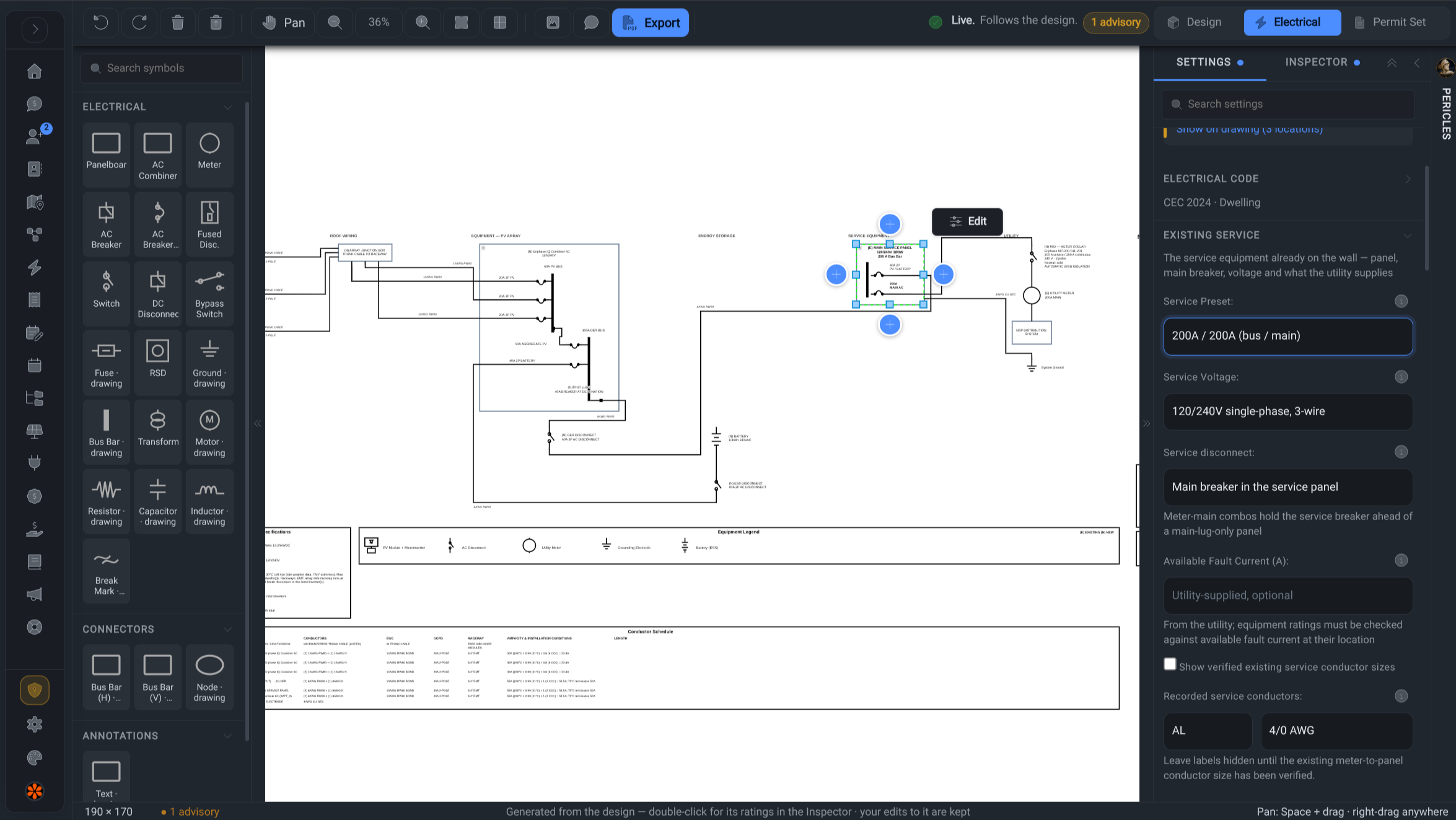
Editable SLD canvas with symbol palette
The Editor

A real editor underneath. Not a locked template.

Everything the generator draws stays a live object on a full drawing canvas. Nudge a disconnect, relabel a wire, or draw the odd thing your AHJ insists on. Other tools give you a picture; this is a diagram.

  • Full electrical symbol palette: inverters, disconnects, breakers, meters, batteries, rapid shutdown, and more
  • Drag, connect, group, and align: wires snap to components and stay attached
  • Upload your own base diagrams or component images and edit on top
  • Satellite or road map background of the actual site, straight from the project address
  • Snap-to-grid, alignment guides, minimap, zoom, undo and redo, full keyboard shortcuts
  • Dark mode for the canvas, animated current flow when you want to show off
Design temperatures and wire runs that drive the permit's string voltages and voltage drop
Permit-Ready Output

Schedules, legends, and a title block worth signing.

The slowest parts of an SLD are the tables nobody enjoys. Powerlily builds them from the same design data, so the paperwork always matches the picture.

  • Conductor schedule: tag, from and to, conductors, ground, overcurrent protection, length, with identical runs collapsed
  • System specification table: modules, string voltages, inverter, rapid shutdown, storage
  • Equipment legend built from the symbols actually on your diagram
  • Project details block with system size, DC/AC ratio, annual production, and your logo
  • Designer and approval block with code edition and a stamp area for your engineer
  • Compliance warnings print on the sheet until you resolve them
  • Crisp print-grade PDF export, portrait or landscape picked automatically
By the numbers

Engineering-grade, one click away.

2 code packs

NEC for the US, CEC for Canada

120 %

busbar rule checked live, three fixes offered

1 click

from string layout to full diagram

100 %

of the generated diagram stays editable

Stop redrawing the same diagram.

Design the system once. Generate the SLD in one click. Edit only what's special.
