
RE+ 2026 · Nov 16–19 · Las Vegas

See what replacing your entire software stack looks like. Booth W15826.

Book a booth demo
Solar design & proposals
Capterra reviews badge

Design solar.
Run the whole business.

3D design, live production and branded proposals, connected to your leads, permits, crews and installed fleet. One platform for the whole solar company.

Get Started

Unlimited users and quotes. Onboarding included.

For teams comparing Aurora and Solargraf. Start with design and proposals, then follow the project through the whole company.

Trusted by solar professionals

Cansolar Corp
OFFGRID SOLAR LTD.
Konergie
M.B. EYE ELECTRICAL INC.
Wesco
Boreal Energy Solutions Inc.
Advanced Level Solar
IEP Energy Economics Ltd.
One project, through the whole company

From the first lead to the next referral.

The lead, system, sale and installation stay connected as the work moves between people.

01Capture, design & sell

Turn interest into a signed solar project.

Start with an enquiry or a conversation at the door. Carry the lead's context into the design, the energy model and the proposal.
Example branded address: thesunbox.ca
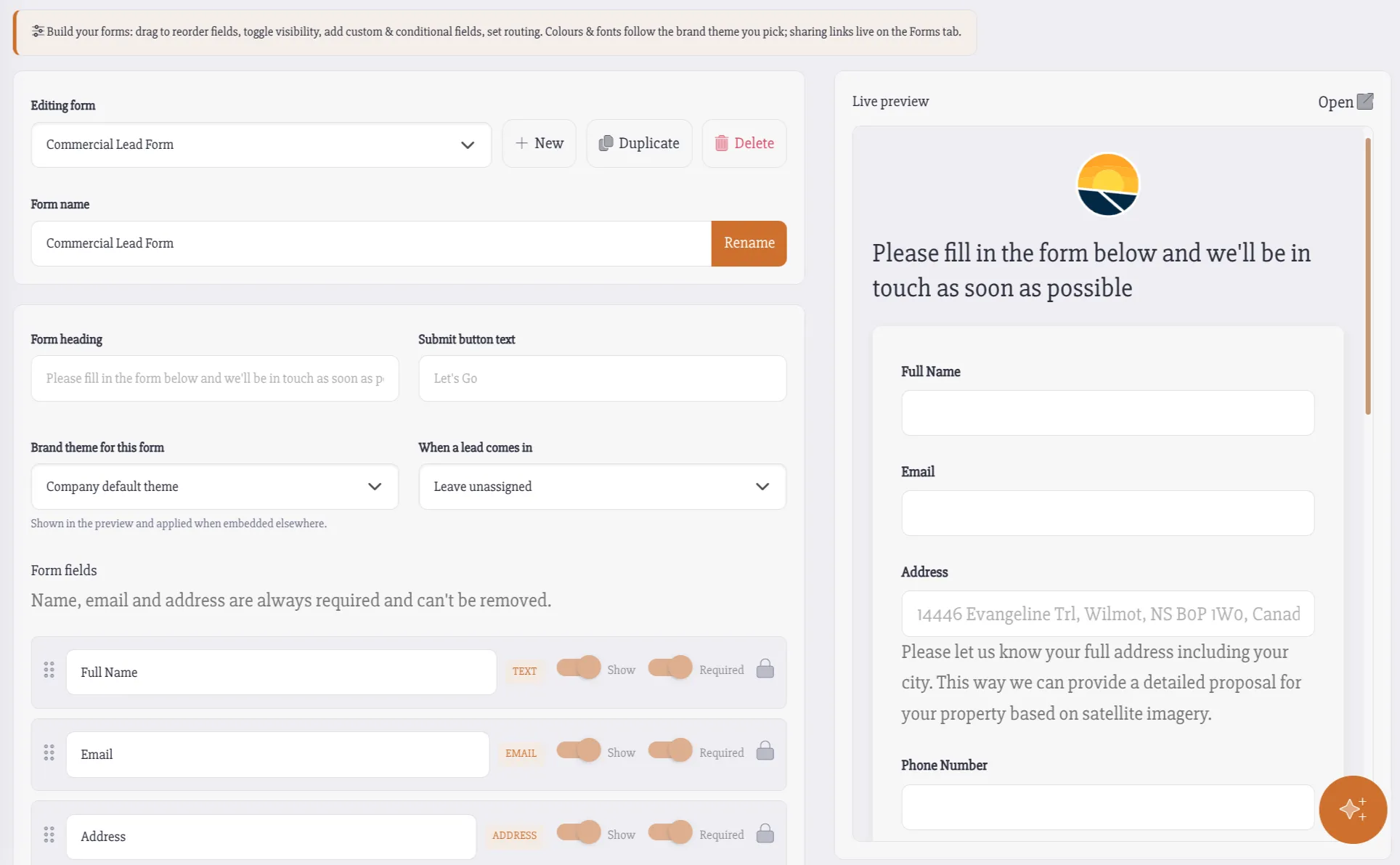
Powerlily lead form builder with branded fields for capturing solar enquiries
Hosted forms, embedded forms and existing website intake feed the same CRM.

Every enquiry arrives ready for your team.

Build branded forms for your offers and campaigns, embed them on your website, or capture submissions from a form you already use. Each lead enters your solar pipeline with its source attached.

  • Custom fields, conditional questions and file uploads.
  • Fixed-owner or round-robin routing, with tasks and follow-up.
Example branded address: thesunbox.ca
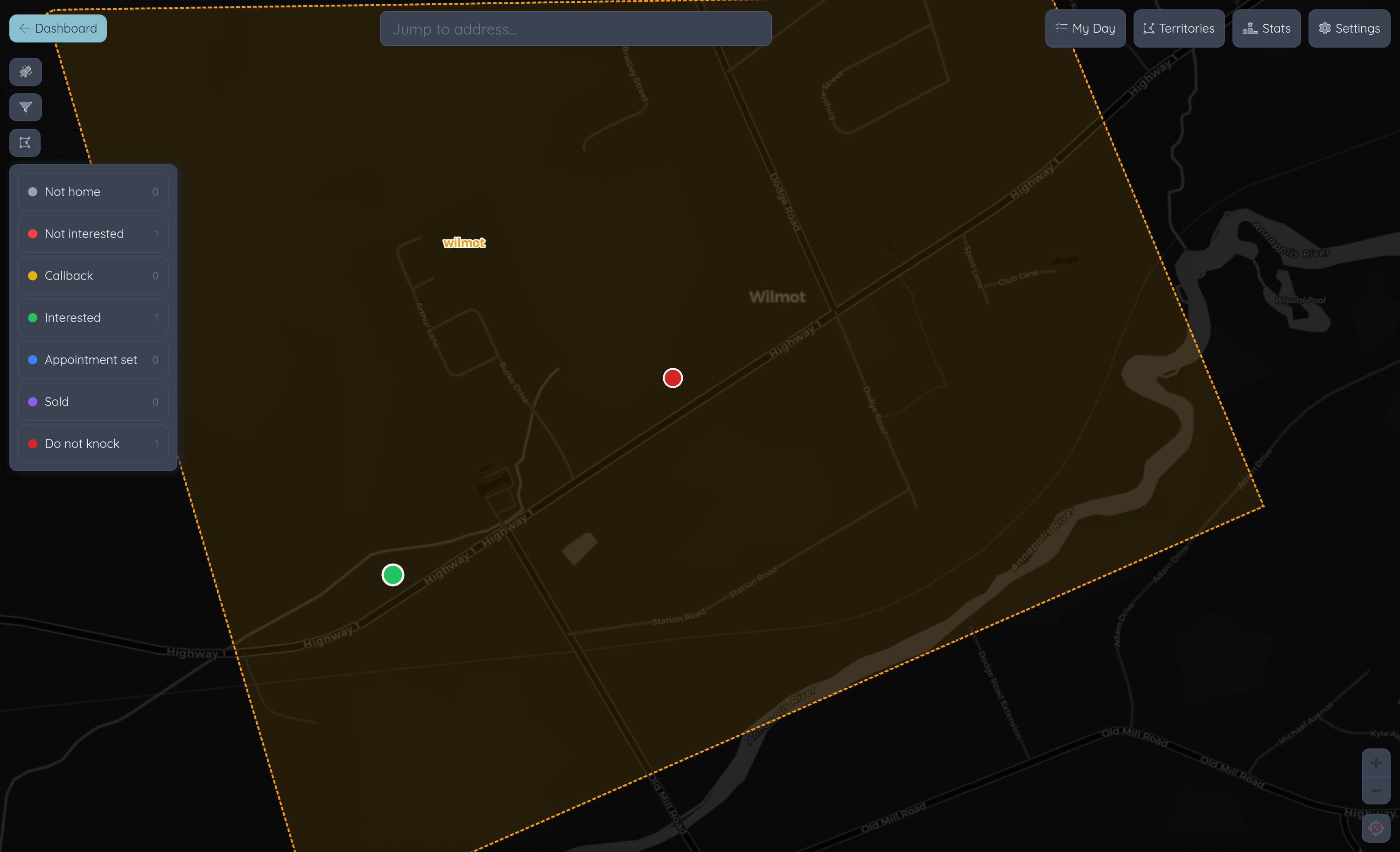
Lilypad canvassing map with assigned territories and property activity
Door activity becomes attributed leads and appointments in Powerlily.

The next solar project can start at the doorstep.

Give canvassers assigned territories and a map of the work around them. Lilypad captures the conversation, creates the lead and books the appointment while the rep is still in the field.

  • Knock dispositions, setter credit and closer routing stay connected.
  • An offline queue carries field activity back when connectivity returns.
Example branded address: thesunbox.ca
The solar design featured in the interactive hero and live demo proposal
The layout, equipment and production become the basis of the sale.

See the system perform as you design.

Work with editable roofs, arrays, trees and obstructions. Shade, stringing and 8,760-hour production on every panel connect the physical design to the energy model.

  • Use aerial imagery, site data or a current drone survey.
  • Model usage, utility rates and battery behaviour against the same project.
Example branded address: thesunbox.ca
Branded Powerlily solar proposal presenting the customer's system and projected savings
Design, price and customer presentation stay connected through signing.

Put the real design in front of the customer.

Send a branded live proposal with the 3D scene, equipment, options and projected savings. Pricing, incentives and financing come from the project your team has already built.

  • Choose Proposal Presets, a responsive proposal or custom documents.
  • Deliver by email or SMS, track engagement and collect e-signatures.
02Engineer, permit & install

The sold system becomes the installation plan.

Carry the actual layout into electrical drawings and coordinated plan sets, then put the job in the hands of the office and the crew.

Example branded address: thesunbox.ca
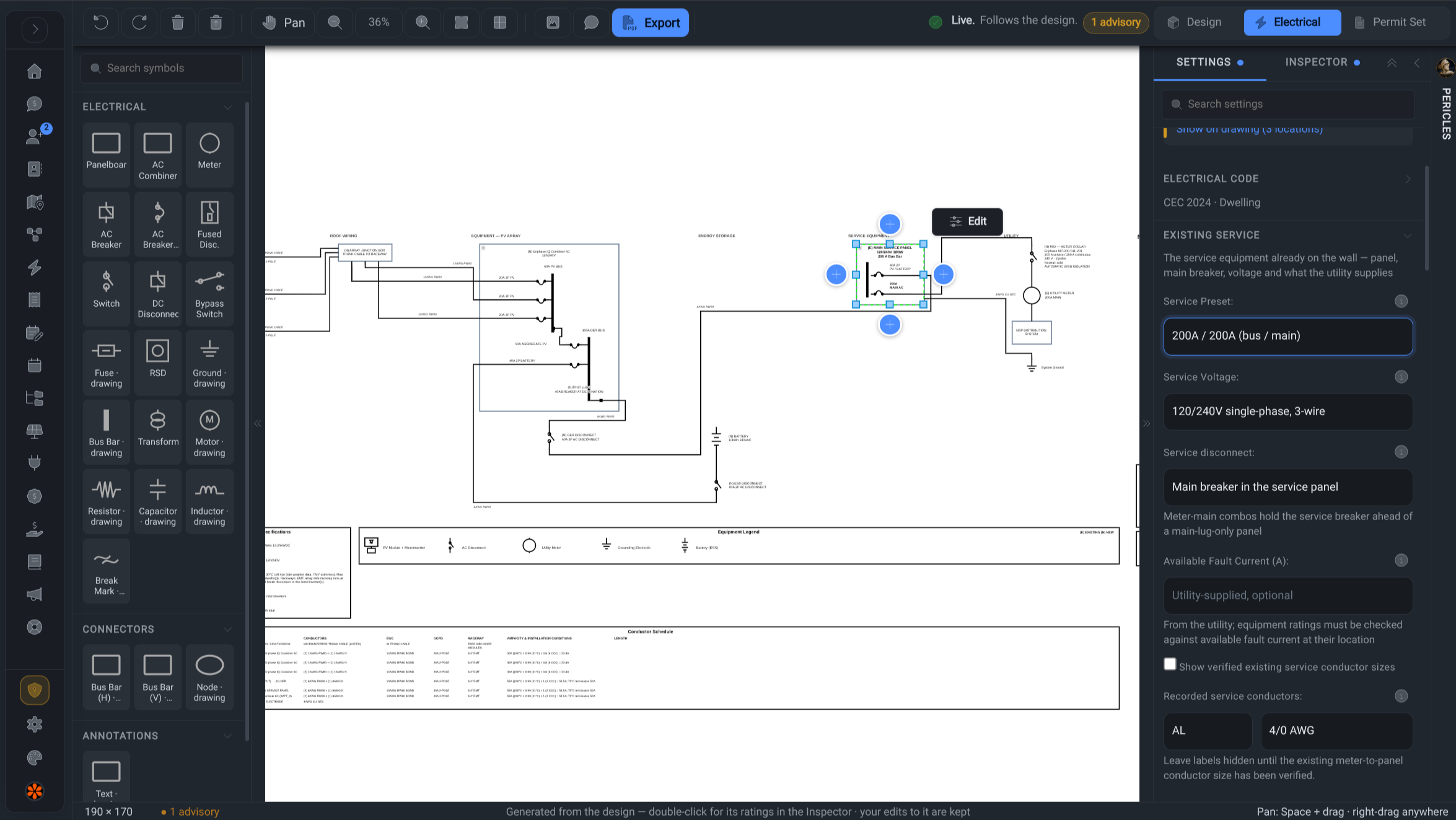
Powerlily editable solar single-line diagram with electrical settings and conductor schedules
The circuit begins with the equipment and stringing already in the project.

Draw the electrical from the real system.

Generate the single-line diagram from the project's string layout, inverters and storage. Review the circuit beside its equipment and electrical settings, with control over the drawing.

  • Work through conductors, protection, voltage drop and code-specific details.
  • Keep the editable electrical design connected to the array and equipment.
Example branded address: thesunbox.ca
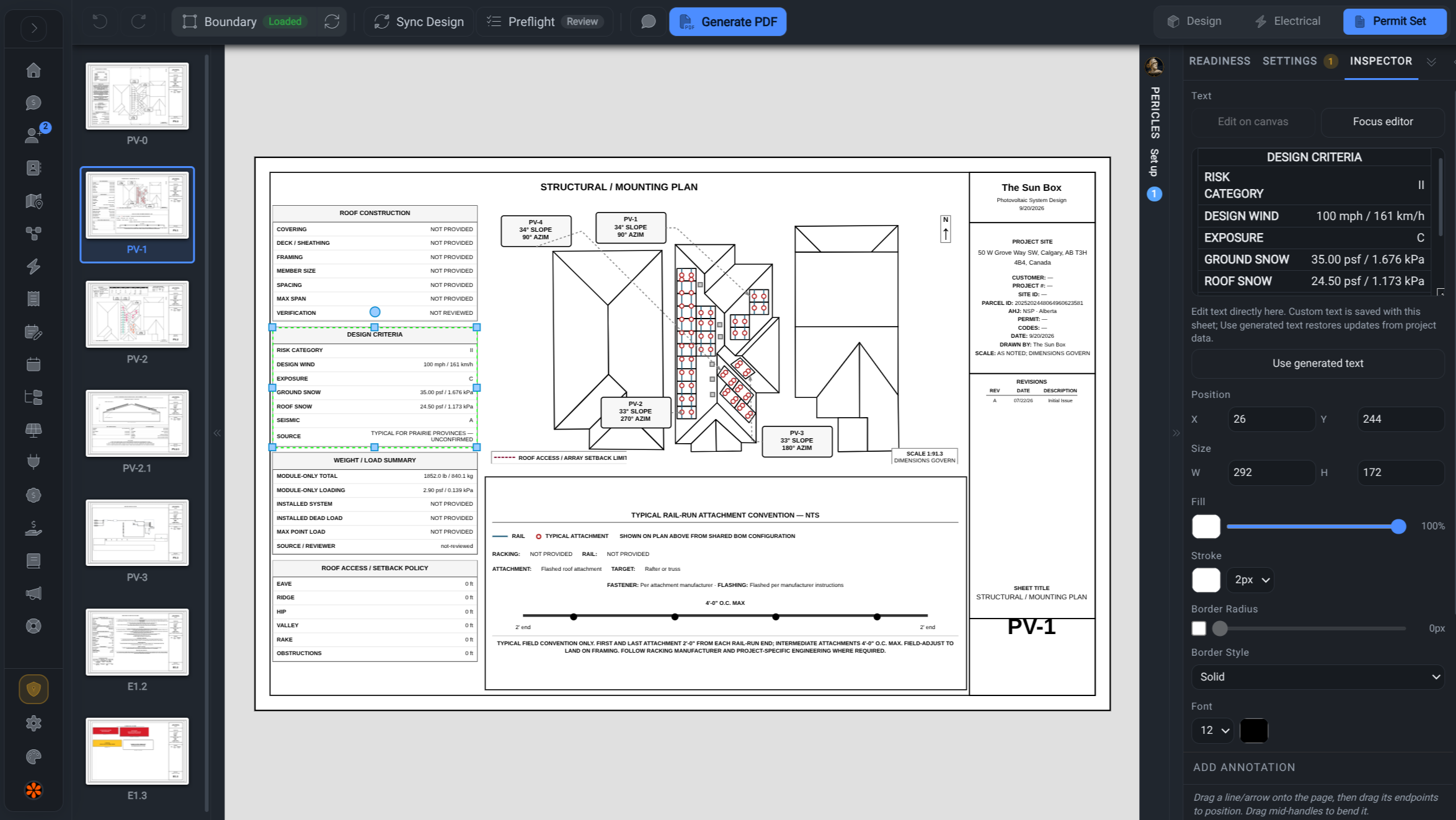
Powerlily plan set editor with a structural roof sheet, mounting details and coordinated sheet navigator
One project supplies the geometry and hardware across the drawing set.

Bring the permit package into agreement.

Build coordinated site, roof, array, structural and electrical sheets from the project. The layout, equipment and supporting specifications carry into the package you prepare for review.

  • Edit sheets, annotations, title blocks, notes and placards.
  • Keep revision history and export the coordinated package with product specs.
Example branded address: thesunbox.ca
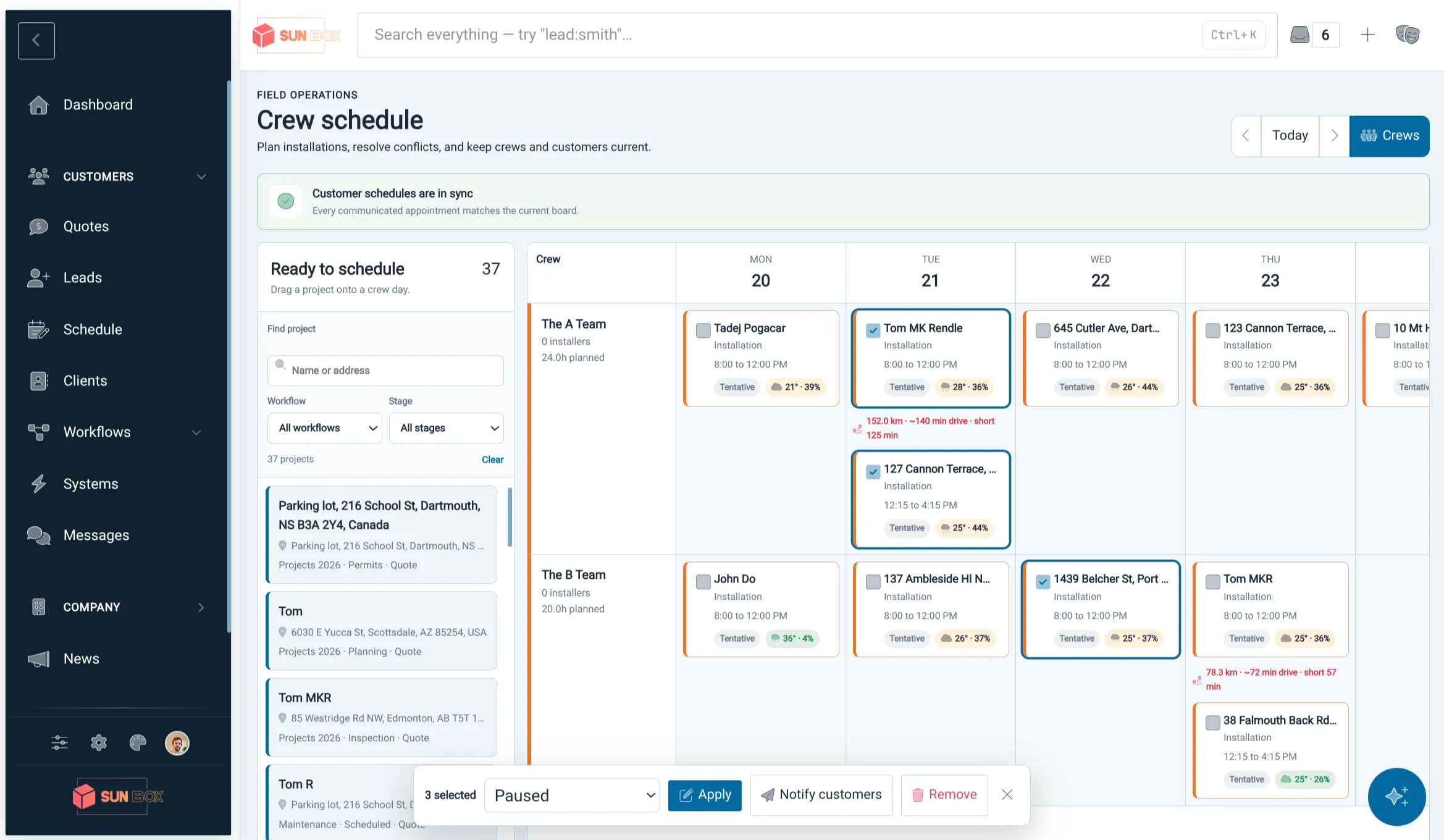
Powerlily crew scheduling workspace with solar projects assigned across the calendar
Office planning reaches the field, and field evidence returns to the project.

Send the crew with the context to do the job.

Coordinate crews with skill, capacity, distance and weather context. Lilypad carries schedules, documents and project details into the field while the office keeps the next step in view.

  • Customer updates, crew statuses and project tasks stay together.
  • Capture installation photos and signed Site Safety records against the job.
03Support & grow

Keep the relationship working after installation.

Bring the installed fleet, customer experience and next opportunity into the same business. Aftercare becomes part of the relationship you keep building.

Example branded address: thesunbox.ca
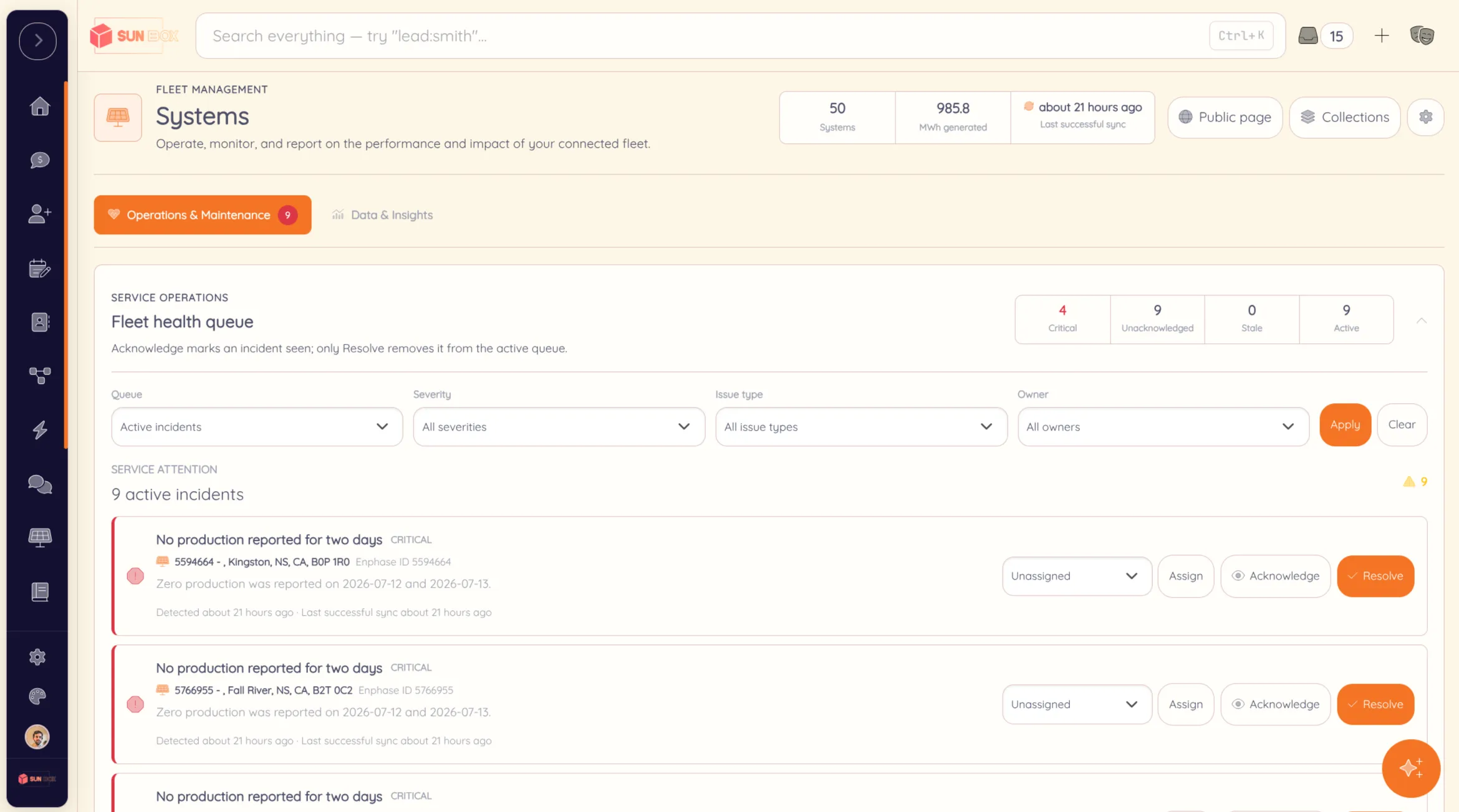
Powerlily installed-fleet health queue showing solar systems that need attention
System health and assigned service work remain connected to the customer.

See the installed fleet across inverter brands.

Connect inverter accounts and bring production, history and health into one view. Keep the customer and original project connected when a system needs attention.

  • Bring Enphase, SolarEdge, APsystems and Tesla into the same fleet.
  • Turn faults, failed syncs and production issues into assigned incidents.
Example branded address: thesunbox.ca
Branded Powerlily client portal with project and solar system information
The customer sees the company they chose, from project progress to production.

Give customers a home under your brand.

Keep progress, documents, installation photos and conversations in one customer destination. After installation, available system production and savings keep that destination useful.

  • Your brand on a Powerlily subdomain, your own subdomain or your main domain.
  • Customers can follow their project, message the team and share their referral link.
Example branded address: thesunbox.ca
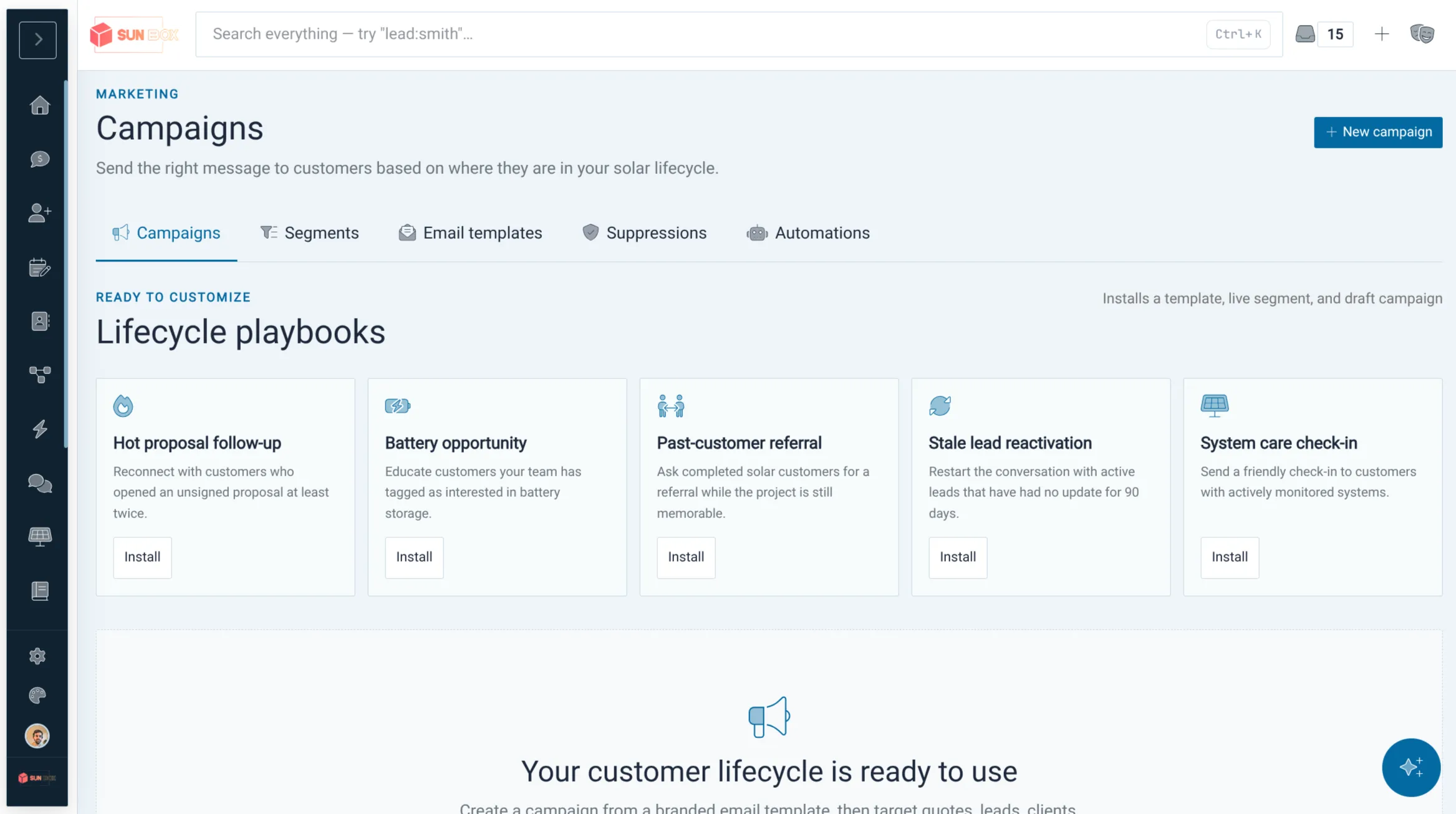
Powerlily branded email campaign workspace with customer audiences and engagement results
The next lead returns to the capture, design and proposal workflow.

Let the relationship create the next opportunity.

Use customer and installed-system context to build relevant campaign audiences. Personal referral links bring introductions back into the same attributed lead pipeline.

  • Send branded campaigns for storage, maintenance and other relevant offers.
  • Keep the referring customer attached to the new lead and its acquisition history.
Powerlily in the field

Meet Lilypad, the field companion to Powerlily.

Take canvassing, projects, crew schedules and Site Safety into the field.

Company pages · Powerlily Pro

Your real work can become your public website.

Connect your inverter accounts. Choose the installations you want to publish. Build pages around their production, your equipment and your expertise, using the records already in Powerlily.

From measured production on a public page to modelled savings in a live proposal, your customer experience can draw on the work your team has already done.

Inverter dataPublished installations & pages

Project designProposal & savings

Arrange connected content in the visual page editor. Start on your branded Powerlily subdomain, connect a subdomain of your own, or make Powerlily your main website.

thesunbox.caLive demo
One company. Its main domain. The Sun Box

TheSunBox.ca runs its public website and company workspace on one main domain. Open the proposal from the design above, then follow the company navigation into the rest of the site.

Your company, at the address that fits.

Your Powerlily subdomain
solarco.powerlily.io

Start with a company-branded Powerlily address, carrying your logo, colours and customer experience.

A subdomain of your own domain
portal.solarco.com

Keep your existing website at your main address. Use your own subdomain for Powerlily proposals, customer access and team sign-in.

Your main domain (apex)
solarco.com

Make Powerlily your company's entire online home: public pages, proposals, customer portal and secure staff workspace.

On your main domain, Powerlily can be both your public website and the platform your team uses to run the company. Published system data and equipment become website content, enquiries enter your CRM, and your team designs, sells and manages the work in the same place.

Custom domains are available on Standard and Powerlily Pro. Custom page creation is included with Powerlily Pro.

Bring the work together

A shorter software list.
A more connected company.

Start with solar design and proposals. Bring the tools around them into the same project, with the same customer history and a place for everyone on your team.

One Powerlily workspace.Unlimited users, branches and quotes. Roles for the whole team.Compare plans

The complete platform

From the first conversation to the next referral.

Follow one project through the business, then explore the capabilities behind every stage. Customer acquisition, solar delivery and long-term care belong in the same story.

Explore every capabilityAcquisition, design, delivery and aftercare
01

Before the sale

Acquire & qualify

Capture demand anywhere and turn it into an owned, measurable solar opportunity.

  1. 01.01
    Your platform can be your website

    Build pages around published installations, reported production, equipment and articles on your own domain. Keep your existing website if you prefer.

  2. 01.02
    Custom lead capture

    Build unlimited hosted or embedded forms with custom and conditional fields, file uploads, branded themes and routing.

  3. 01.03
    Capture your existing website

    A lightweight script records submissions from forms you already use, so replacing the website or its forms is optional.

  4. 01.04
    Lilypad canvassing

    Give door knockers territories, property context, seven dispositions and offline lead and appointment capture on the go.

  5. 01.05
    Attribution and ownership

    Preserve campaign, referral, API, import and canvass sources, setter credit, closer assignment and round-robin routing.

  6. 01.06
    Solar-native pipeline

    Qualify on a configurable board with stages, tasks, events, notes, tags, files, reminders and conversion into the same project.

  7. 01.07
    Follow-up and intelligence

    Use response and conversion analytics, audience campaigns and multi-step automations to keep opportunities moving.

02

Sale to installation

Design, sell & deliver

Take the real property through engineering, contract, permit, payment and field execution without rebuilding the job.

  1. 02.01
    Site truth, your choice

    Combine aerial imagery, Regrid parcels, elevation data or a current drone survey with editable roof geometry.

  2. 02.02
    Live 3D design

    Lay out roof, ground, carport and commercial arrays with stringing, setbacks, shade and 8,760-hour per-panel production.

  3. 02.03
    Energy and storage economics

    Connect bills, interval usage, tariffs, incentives and financing to hour-by-hour battery behavior and 30-year value.

  4. 02.04
    Catalog, materials and price

    Use approved specifications, equipment variants, design-derived BOM quantities, price-per-watt, adders and deductions.

  5. 02.05
    Proposals that close

    Send branded Proposal Presets, responsive web proposals or custom documents with options, terms, 3D scenes and defensible e-signatures.

  6. 02.06
    Connected teamwork

    Keep project workflows, tasks, calendars, comments, customer and team conversations, watchers, branches, permissions and automations together.

  7. 02.07
    Editable electrical design

    Generate the single-line diagram from the real string layout, then edit equipment, conductors and code-specific details.

  8. 02.08
    Permit-ready plan sets

    Build coordinated sheets, site and array plans, placards, specifications and revision history from the project.

  9. 02.09
    Invoices and collections

    Turn project value into branded invoices, secure customer links, payment records and one connected commercial ledger.

  10. 02.10
    Dispatch and field execution

    Schedule crews with skill, capacity, distance, conflict and weather context, then capture status and signed Site Safety records in the field.

03

After installation

Operate & grow

Make the installed base a service, retention, upsell and referral engine for the next decade.

  1. 03.01
    One installed fleet

    Bring Enphase, SolarEdge, APsystems and Tesla into one map, health view and production history with no per-system fee.

  2. 03.02
    Service before the customer calls

    Turn provider faults, failed syncs, zero production and stale data into assigned, severity-based incidents and automations.

  3. 03.03
    A portal under your brand

    Give customers project progress, documents, photos, messages, production, savings, knowledge and support on your domain.

  4. 03.04
    Lifecycle growth

    Segment the installed base and use campaigns, system context and automations for batteries, service plans, maintenance and other relevant offers.

  5. 03.05
    Trust that compounds

    Keep the relationship useful with performance visibility, company knowledge, direct messaging and timely review requests.

  6. 03.06
    The next customer

    Every client has a personal referral link. The resulting lead keeps its referrer and source, then re-enters stage one.

THE LOOP CLOSES Great aftercare becomes the next qualified lead.

Production, service history, campaigns, reviews and personal referral links keep the relationship alive. A referral enters the same attributed pipeline at stage one.

Client portal Referral New lead
BUILT THROUGH EVERY STAGE One record, one brand, one operating system.
  • One customer and project record
  • Unlimited users, branches and quotes
  • Roles and permissions
  • Web and native mobile
  • Pericles assistance
  • API and signed webhooks
  • Google sign-in and calendar
  • Email, SMS and push
Live every Friday

See Powerlily live. Bring your questions.

A free 45-minute demo, every week: watch a real roof designed in 3D, a proposal built and sent, and a live fleet dashboard. Then ask us anything.

  • Every Friday at 4:00 p.m. Atlantic (3:00 p.m. Eastern, noon Pacific)
  • Live video call, join from any browser, dial-in available
  • Real designs and live Q&A, not a slide deck
Next session Friday, October 30 · 4:00 PM Atlantic

Protected by reCAPTCHA (Privacy · Terms). We'll only email you the joining details.

FAQ

Frequently Asked Questions

Straight answers about pricing, setup, and what Powerlily includes.

Yes. Unlimited users, unlimited quotes, unlimited systems — all included in one price. We don't charge per seat, per quote, or per system.

Yes. Create unlimited branches, assign staff and work by location, and keep a company-wide view. Multi-location management is included on every plan, with no enterprise upgrade or per-location fee.

We support Enphase, SolarEdge, APsystems, and Tesla Powerwall with bring-your-own API keys. No markup, no scraping, no third-party data fees.

Our 3D design tool includes hourly, per-panel irradiance simulation using the Perez sky model. We also offer DSM elevation integration, LIDAR-based roof plane detection, and editable single-line diagrams.

Absolutely. Use pre-built templates or drop into our drag-and-drop visual editor to redesign every pixel. Add custom CSS, embed 3D scenes, and use AI to generate content.

Yes. Send customers proposal links, signature requests, secure invoice links, appointment confirmations, reminders, reschedules, cancellations, and crew-on-the-way updates. Team members can also verify their own phone number and opt in to text alerts for new leads, first proposal opens, and signed quotes.

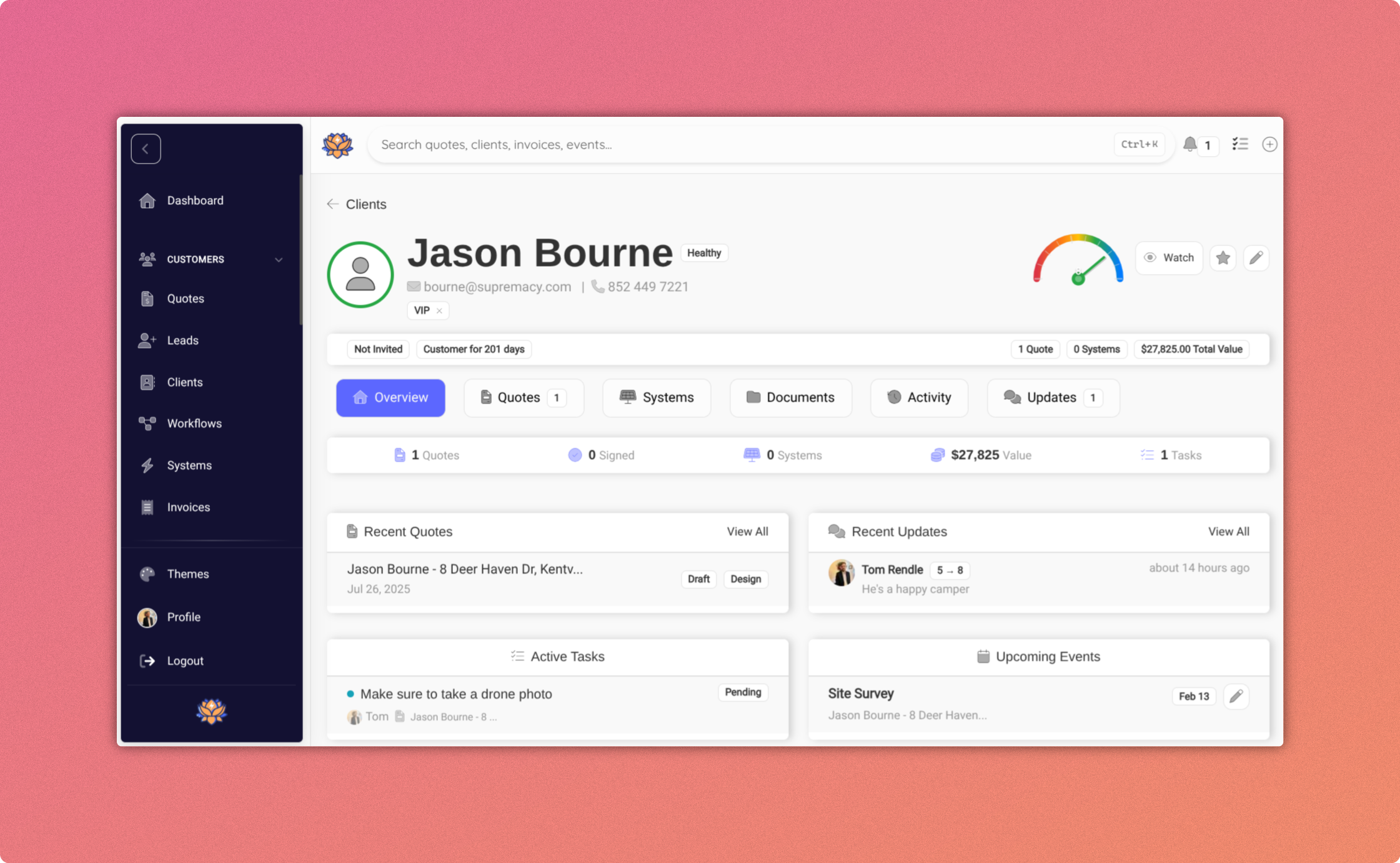
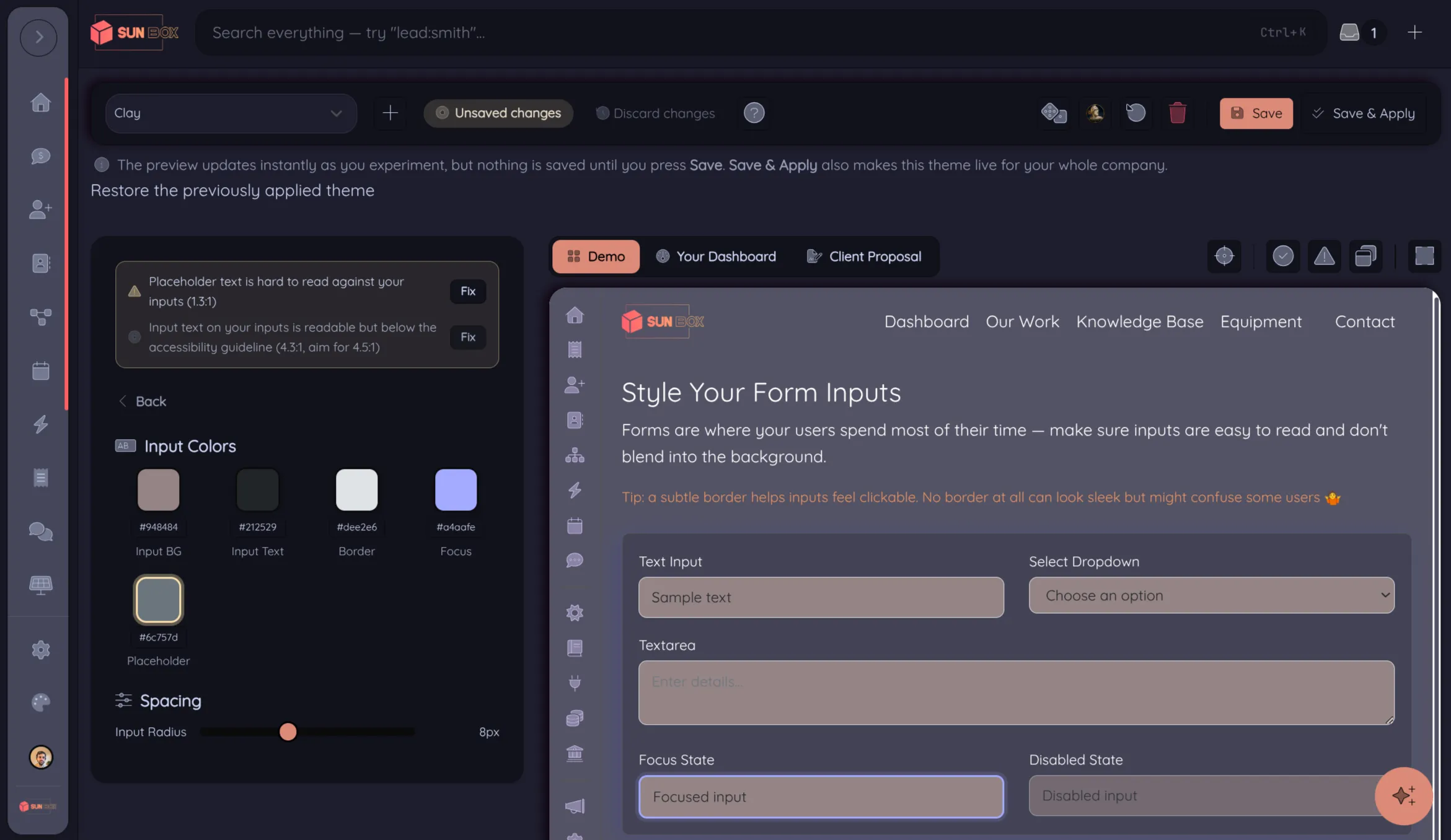
Your customers get their own branded portal (my.yourcompany.com) with production data, project tracking, two-way messaging, and a personal referral link. Full theme control with your brand.

Build playbooks that fire on real events: quotes sent, opened, or signed, deals going quiet, etc. Powerlily creates tasks, sends emails, notifies the team, and advances deals automatically.

Both. Powerlily is a unified platform that handles lead capture, design, proposals, project management, and fleet monitoring. Our CRM includes pipelines, a shared calendar with Google Calendar integration, and in-app team chat per deal.

Pericles is our AI assistant that answers questions about your business from your own data — quotes, leads, customers, and pipeline. @mention it in any deal to summarize a customer or draft a follow-up. Included with Powerlily Pro.

Most customers are up and running in under 5 minutes. We include expert onboarding support to get you started quickly.

Start with solar design.
Bring the whole business with you.

Give sales, design, the office and the field a shared place to work. Unlimited users, with onboarding included.

Pericles
Pericles
Powerlily assistant
Replies instantly. Leave your email anytime and a human follows up.